How to use turn signals, headlights and hazard lights in GTA VI
Sources checked
In a car on the default PS5 layout, tap D-pad Left or Right to flash that side’s turn signal. Hold Left to open the strip for radio and vehicle controls. From there you can select a headlight beam or make both sides flash together.
Flash a left or right turn signal
Sit in the driver’s seat with the camera behind the car so you can see its rear lights. Give D-pad Left a short tap and look at the left lamp. Try a short tap to the right for the other side. If the radio strip or Partner Menu appears, the game read your press as a hold. Release the button and try a quicker tap.
Choose high beams, low beams or automatic headlights
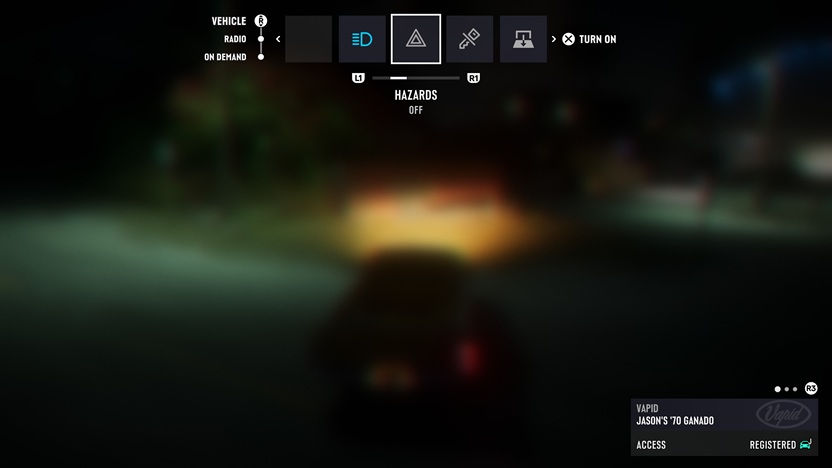
A tap of Circle operates the headlights in the ordinary driving view. To choose a specific beam or return to automatic lighting, use the Vehicle tab. How To Video Game recorded the radio and vehicle tabs on PS5.
- Hold D-pad Left while seated in the car. If you see station names, push the right stick up to Vehicle.
- Move along the strip with L1 or R1 to Headlights. Select the setting you want from automatic, low beam, high beam and off.
- Close the strip to see the result. Returning to automatic lets the game bring the lights on at night.
Turn hazard lights on or off
To flash both indicators while parked, open the same Vehicle tab. Use L1 or R1 to highlight the triangle labelled Hazards. With it set to Off, press Cross at Turn On. Close the strip and look for both sides flashing. To stop them, go back to Hazards and toggle it again. GTA Base shows the prompt in Jason’s Ganado.